 PDFmule
 API Documentation
1. Introduction
PDFmule is a REST API service that converts a request's raw HTML/CSS code or a webpage fetched from a request's URL into a PDF, PNG, or JPEG file. You can integrate the API into your application to generate documents or images synchronously or asynchronously. Converted results can be returned either directly as raw binary data in the response body or as URLs pointing to converted files. Files may optionally be served through PDFmule's CDN for up to 48 hours.
2. Authentication
You need an API key to access the PDFmule API. You must include this key in the x-api-key header field.
x-api-key: YOUR_API_KEYTo generate a new API key, log in to your account, navigate to the Account page, and click "Generate New API Key".
3. Making Coversions
3.1. POST Request Endpoints
POST https://api.pdfmule.com/v1/convert/pdf
POST https://api.pdfmule.com/v1/convert/jpeg
POST https://api.pdfmule.com/v1/convert/png
To initiate a conversion, send a POST request to the endpoint corresponding to your desired output file format. Your request must include two headers: an x-api-key: YOUR_API_KEY header for authentication and a Content-Type: application/json header. It must also include a JSON body containing your conversion options. Within the JSON body, either the html or url field is mandatory; all other options have default values.
When sending raw HTML and CSS via the html field, your request body must follow standard JSON string formatting rules:
- Minify to a Single Line: Remove all line breaks and newlines from your HTML code. JSON strings cannot contain unescaped literal line breaks.
- Escape Double Quotes: If your HTML attributes use double quotes (e.g.,
<div class="container">), escape them with a backslash (\") or use single quotes (') for your markup attributes to avoid breaking the JSON structure.
Request Headers (required)
x-api-key: YOUR_API_KEY
Content-Type: application/json
Request Body Examples (application/json)
{
  "html": "<!DOCTYPE html><html><head><style>body { font-family: sans-serif; padding: 2rem; color: #92400E; }</style></head><body><h1>Hello World!</h1></body></html>"
}
{
"url": "https://example.com",
"responseType": "binary"
}3.2. Synchronous Conversions
By default, PDFmule processes conversions synchronously.
When you send a request with the async field set to false (or omit it entirely), the API blocks until the file is fully generated and returns the result directly in the HTTP response. The response will contain either the raw binary file data or a file URL depending on the value of the responseType option.
Response
On success, the response format depends on the request's responseType option:
"binary": Returns the raw binary file data with the appropriate content-type header (e.g.,application/pdf,image/png, orimage/jpeg)."json"(default) : Returns a JSON payload containing the download URL:
{
  "downloadUrl": "https://cdn.pdfmule.com/outputs/dWvm3BlRE9mnY6w4.pdf",
  "metadata": {}
}3.3. Asynchronous Conversions
For larger documents, complex pages, or high-volume workflows that take longer to render, you can process conversions asynchronously in the background.
When you send a request with the async field set to true, the API queues the conversion job and returns an immediate response containing a unique job ID and a status URL. (Note: The binary response option is not available for asynchronous conversions; all completed background conversion jobs return a JSON payload with a download URL.)
Initial Response
When the conversion request is successfully queued, the API returns a JSON object containing the job details:
{
  "jobStatus": "queued",
  "jobId": "6chVTfTMI7t530dq",
  "statusUrl": "https://api.pdfmule.com/v1/convert/6chVTfTMI7t530dq"
}
Polling for Completion
GET https://api.pdfmule.com/v1/convert/{jobId}
To check the progress of the conversion, send periodic GET requests to the statusUrl provided in the initial response. (Note: Just like your initial request, these polling requests must include your x-api-key: YOUR_API_KEY header for authentication.)
Continue polling at regular intervals (e.g., every 1–2 seconds) until the jobStatus changes to "completed" (or "failed"). Once completed, the final response payload will include your download URL:
{
  "jobStatus": "completed",
  "jobId": "6chVTfTMI7t530dq",
  "downloadUrl": "https://cdn.pdfmule.com/outputs/6chVTfTMI7t530dq.pdf",
  "metadata": {}
}
4. Options
You can customize your conversions using the following fields. Either the url or html field is required; all other fields can be included in the JSON request body or omitted if their default values are acceptable.
| Option | Description | Required | Default |
|---|---|---|---|
url |
(string) The URL of the webpage to convert. | Yes (unless html is provided) |
N/A |
html |
(string) The raw HTML and CSS code to convert. | Yes (unless url is provided) |
N/A |
async |
(boolean) When true, the API queues the conversion job and returns an immediate response containing a unique job ID and a status URL for GET status checks. When false, the API converts synchronously and waits to return the generated document in the response (false or true). | No | false |
viewportWidth |
(integer) The width of the viewport in pixels. | No | 1280 |
viewportHeight |
(integer) The height of the viewport in pixels. | No | 720 |
scale |
(string) Whether each converted file pixel is based on a single corresponding CSS pixel or device pixel ("device" or "css"). | No | "device" |
clip |
(object) Defines a clipping area using coordinates and dimensions (x, y, width, height). Coordinates (x, y) define the top-left corner of clipping area. Can only be used for JPEG or PNG conversions. Example: "clip": { "x": 100, "y": 50, "width": 640, "height": 480 } |
No | no clipping |
hideSelectors |
(array of strings) A list of CSS selectors for elements that should be hidden on the page before the conversion. Example: "hideSelectors": ["#navigation-bar", ".cookie-notice-modal", "h1"] |
No | [] |
fullPage |
(boolean) Whether to capture the entire scrollable page (false or true). | No | false |
quality |
(integer) The converted image quality on a scale of 0 to 100. Only applies to JPEG images. | No | 100 |
animations |
(string) Whether to allow CSS animations, CSS transitions, and Web Animations ("allow" or "disabled"). | No | "allow" |
caret |
(string) Whether to hide text caret or leave it unchanged ("hide" or "initial"). | No | "hide" |
omitBackground |
(boolean) Hide a white default background to enable conversions with transparent regions. Only applies to PNG images (false or true). | No | false |
responseType |
(string) The expected server response type ("json" or "binary"). The raw binary file data response option is only available for synchronous conversions. | No | "json" |
timeout |
(integer) The maximum time (in milliseconds) to wait for the webpage to load and become ready before rendering the output file. Defaults to 0 (no explicit function timeout). Range: [0, 29000]. Note: Regardless of this setting, the total synchronous request execution time is bounded by the server's 29,000 ms infrastructure timeout. | No | 0no timeout |
5. Error Responses
5.1. Example Error Response Body
{
  "statusCode": 401,
  "error": {
    "code": "AuthError",
    "message": "Unauthorized: Missing or invalid API key."
  }
}
When an error occurs, the API returns a JSON response containing a top-level statusCode and an error object. The nested error object provides a machine-readable code and a descriptive message explaining the failure.
5.2 Error Status Codes
When a request fails, PDFmule returns standard HTTP status codes along with a JSON payload explaining the issue.
| Status Code | Error Type | Error Code | Description |
|---|---|---|---|
| 400 | Bad Request | RequestValidationError | Malformed JSON, missing required fields (like url or html), or invalid option parameters. |
| 401 | Unauthorized | AuthError | Missing, invalid, or expired x-api-key header. |
| 403 | Access Denied | InsufficientCredits | Monthly credits limit reached or subscription is not active. |
| 404 | Resource Not Found | JobNotFoundError | Conversion job was not found or has expired. (Applies only to responses to GET polling requests for asynchronous conversions.) |
| 500 | Internal Server Error | ServerError | An unexpected server-side error occurred. If this issue persists, please contact support. |
| 504 | Gateway Timeout | GatewayError | The request timed out because page rendering exceeded the 29,000 ms synchronous limit. Consider using asynchronous processing. |
6. Subscription Credit Tracking Headers
Every successful synchronous conversion response and every completed asynchronous job polling response (via GET) includes HTTP headers to help you monitor your monthly credit consumption in real time.
6.1 Credit Tracking Header Reference
| Header | Description |
|---|---|
X-Credits-Charged |
The number of credits deducted for the current conversion. (Included only on synchronous conversion responses). |
X-Credits-Used |
The total number of credits consumed during the current billing month. |
X-Credits-Remaining |
The number of credits remaining in the current monthly allotment. |
X-Credits-Limit |
The maximum total monthly credit limit for your subscription plan. |
6.2. Example Response Headers
HTTP/1.1 200 OK
Content-Type: application/json
X-Credits-Charged: 1
X-Credits-Used: 2575
X-Credits-Remaining: 7425
X-Credits-Limit: 10000
6.3. Important Notes on Credit Deductions
- Successful Conversions Only: Credits are only deducted for successfully completed conversions. Failed or invalid requests do not incur a credit charge.
-
Asynchronous Polling Behavior: When using asynchronous jobs, credit deduction occurs strictly when the job finishes processing. Consequently:
X-Credits-Chargedis omitted from GET polling requests because polling checks status and does not incur any additional charges.- Only the final completed polling response includes updated running totals (
X-Credits-Used,X-Credits-Remaining, andX-Credits-Limit).
7. Examples
7.1. cURL
POST Request (synchronous conversion)
curl -X POST \
    https://api.pdfmule.com/v1/convert/png \
    -H 'x-api-key: YOUR_API_KEY' \
    -H 'Content-Type: application/json' \
    -d '{ "url": "https://example.com" }'
Response
{
    "downloadUrl": "https://cdn.pdfmule.com/outputs/sYMvZNJZIoiF5qZr.png",
    "metadata": {
        "width": 1280,
        "height": 720
    }
}
POST Request (synchronous conversion with binary response type option)
curl -X POST \
    https://api.pdfmule.com/v1/convert/png \
    -H 'x-api-key: YOUR_API_KEY' \
    -H 'Content-Type: application/json' \
    -d '{ "url": "https://apple.com", "responseType": "binary", "viewportWidth": 320, "viewportHeight": 480 }'
Response (image as binary data)

7.2. Node.js
POST Request (synchronous conversion)
import fetch from 'node-fetch'; // Omit if using Node.js 18+ (global fetch)

const apiKey = process.env.PDFMULE_API_KEY; // Store your API key securely.
const apiPdfConversionEndpointUrl = 'https://api.pdfmule.com/v1/convert/pdf';

async function capturePdf() {
  if (!apiKey) {
    console.error('API key not found in environment variable PDFMULE_API_KEY');
    process.exitCode = 1;
    return;
  }

  const postData = {
    url: 'https://www.example.com',
  };

  try {
    const response = await fetch(apiPdfConversionEndpointUrl, {
      method: 'POST',
      headers: {
        'x-api-key': apiKey,
        'Content-Type': 'application/json',
      },
      body: JSON.stringify(postData),
      signal: AbortSignal.timeout(30000),
    });

    if (!response.ok) {
      const errorBody = await response.text();
      console.error(`API Error (${response.status}):`, errorBody);
      process.exitCode = 1;
      return;
    }

    const data = await response.json();
    console.log('Response:', data);

    if (data.downloadUrl) {
      console.log('PDF URL:', data.downloadUrl);
    }
  } catch (error) {
    console.error('Error converting PDF:', error);
    process.exitCode = 1;
  }
}

capturePdf();
Console Output
Response: {
  downloadUrl: 'https://cdn.pdfmule.com/outputs/dWvm3BlRE9mnY6w4.pdf',
  metadata: {}
}
PDF URL: https://cdn.pdfmule.com/outputs/dWvm3BlRE9mnY6w4.pdf
POST Request Followed by GET Polling Requests (asynchronous conversion)
import fetch from 'node-fetch'; // Omit if using Node.js 18+ (global fetch)

const apiKey = process.env.PDFMULE_API_KEY;
const apiEndpoint = 'https://api.pdfmule.com/v1/convert/pdf';

const sleep = (ms) => new Promise((resolve) => setTimeout(resolve, ms));

async function convertUrlToPdfAsync(targetUrl, { pollIntervalMs = 2000, maxAttempts = 30 } = {}) {
  if (!apiKey) {
    console.error('Missing PDFMULE_API_KEY environment variable.');
    process.exitCode = 1;
    return;
  }

  try {
    // 1. Submit the async conversion job
    const submitResponse = await fetch(apiEndpoint, {
      method: 'POST',
      headers: {
        'x-api-key': apiKey,
        'Content-Type': 'application/json',
      },
      body: JSON.stringify({
        url: targetUrl,
        async: true,
      }),
      signal: AbortSignal.timeout(10000),
    });

    if (!submitResponse.ok) {
      const errorBody = await submitResponse.text();
      console.error(`Failed to create job (${submitResponse.status}): ${errorBody}`);
      process.exitCode = 1;
      return;
    }

    const { jobId } = await submitResponse.json();
    if (!jobId) {
      console.error('Response did not include a jobId.');
      process.exitCode = 1;
      return;
    }

    console.log(`Job created: ${jobId}`);

    // 2. Poll until completed or failed
    const pollUrl = `${apiEndpoint.replace(/\/pdf$/, '')}/${jobId}`;

    for (let attempt = 1; attempt <= maxAttempts; attempt++) {
      await sleep(pollIntervalMs);

      const pollResponse = await fetch(pollUrl, {
        method: 'GET',
        headers: {
          'x-api-key': apiKey,
        },
        signal: AbortSignal.timeout(10000),
      });

      if (!pollResponse.ok) {
        const errorBody = await pollResponse.text();
        const isRetryable = pollResponse.status === 429 || pollResponse.status >= 500;
        if (isRetryable && attempt < maxAttempts) {
          console.warn(`Transient poll error (${pollResponse.status}), retrying...`);
          continue;
        }
        console.error(`Polling failed (${pollResponse.status}): ${errorBody}`);
        process.exitCode = 1;
        return;
      }

      const job = await pollResponse.json();
      console.log(`Attempt ${attempt}/${maxAttempts} — status: ${job.status ?? 'unknown'}`);

      if (job.status === 'completed') {
        if (!job.downloadUrl) {
          console.error('Job completed, but no downloadUrl was returned.');
          process.exitCode = 1;
          return;
        }
        console.log('Conversion complete. Download URL:', job.downloadUrl);
        return;
      }

      if (job.status === 'failed') {
        console.error('Conversion job failed:', job.error ?? 'Unknown error');
        process.exitCode = 1;
        return;
      }
    }

    console.error(`Timed out after ${maxAttempts} polling attempts.`);
    process.exitCode = 1;
  } catch (error) {
    console.error('Unexpected error during conversion:', error);
    process.exitCode = 1;
  }
}

convertUrlToPdfAsync('https://www.example.com');
Console Output
Job created: dWvm3BlRE9mnY6w4
Attempt 1/30 — status: processing
Attempt 2/30 — status: completed
Conversion complete. Download URL: https://cdn.pdfmule.com/outputs/dWvm3BlRE9mnY6w4.pdf
7.3. Hiding Specific Elements
Hiding Elements with hideSelectors
Many websites display cookie consent modals that can obscure the main content. Using the hideSelectors option, you can instruct the API to hide these elements before rendering a conversion. The following example shows how to target and hide a typical cookie policy modal.
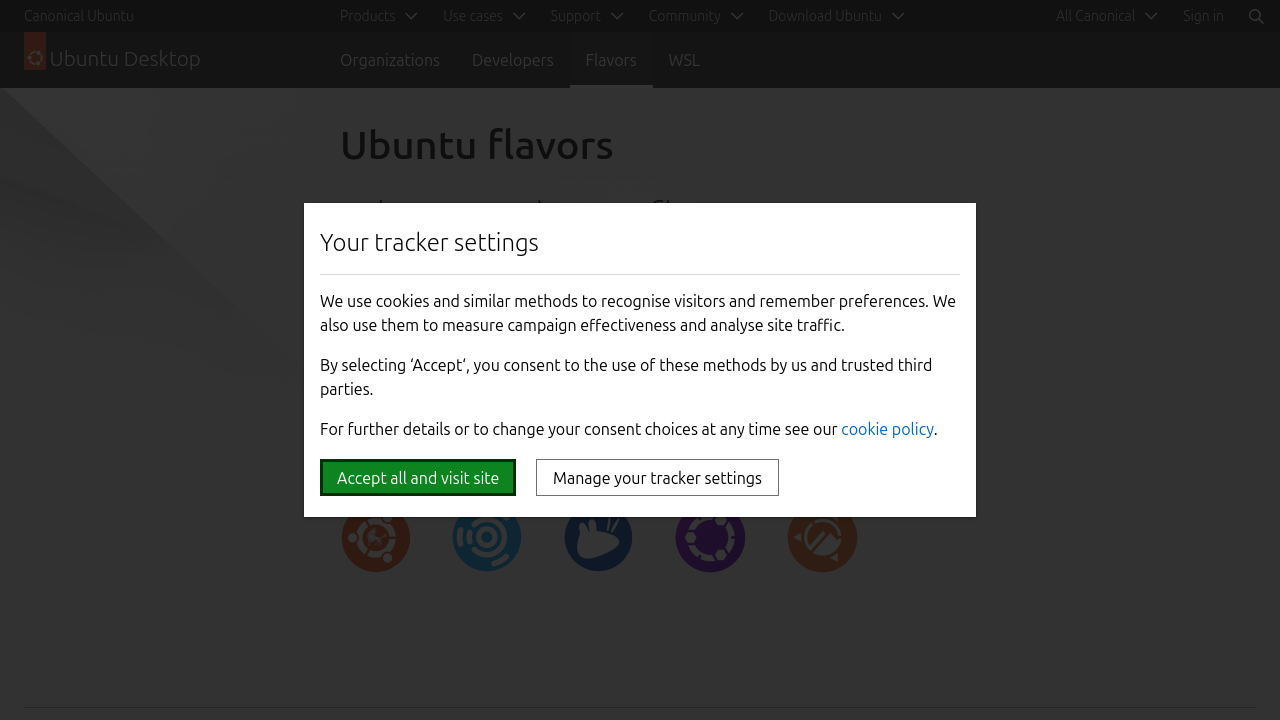
POST Request Body using hideSelectors
{
    "url": "https://ubuntu.com/desktop/flavors",
    "hideSelectors": ["#modal"],
    "responseType": "binary"
}
Response

In the example below, the hideSelectors option was used to hide additional elements, like the navigation bars and the heading.
POST Request Body
{
    "url": "https://ubuntu.com/desktop/flavors",
    "hideSelectors": ["#modal", "#navigation", ".p-navigation", "h1"],
    "responseType": "binary"
}
Response

© 2026 PDFmule.